A Google Shopping specialist who actually reads your product feed
Most “Google Shopping management” is Performance Max with a lipstick label. The feed goes in, Google’s algorithm goes brrr, a weekly report comes out. Adgenix is a Google Shopping specialist in Melbourne who still reads feeds line by line, rewrites product titles against the search terms that actually convert, and knows the difference between a Merchant Centre disapproval that matters and one that’s cosmetic.
Why Google Shopping needs a real specialist, not just a “Google Ads guy”
Google Shopping looks simpler than Search because you don’t write ads. Google pulls product titles, images, and prices from your feed and renders them automatically. That surface simplicity hides three failure modes:
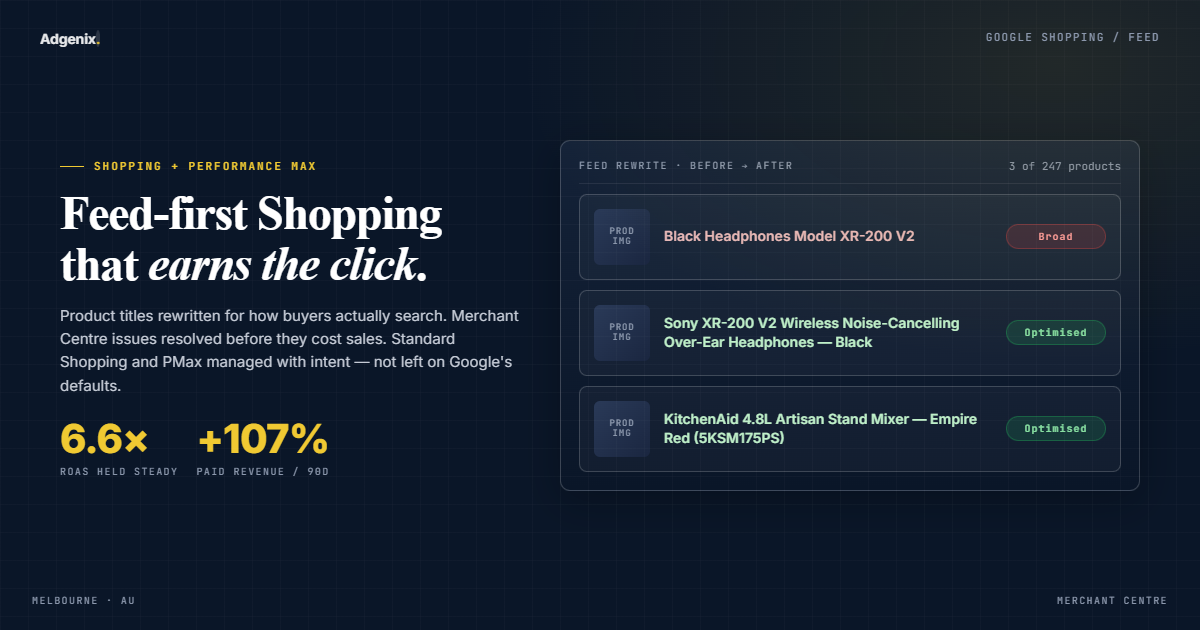
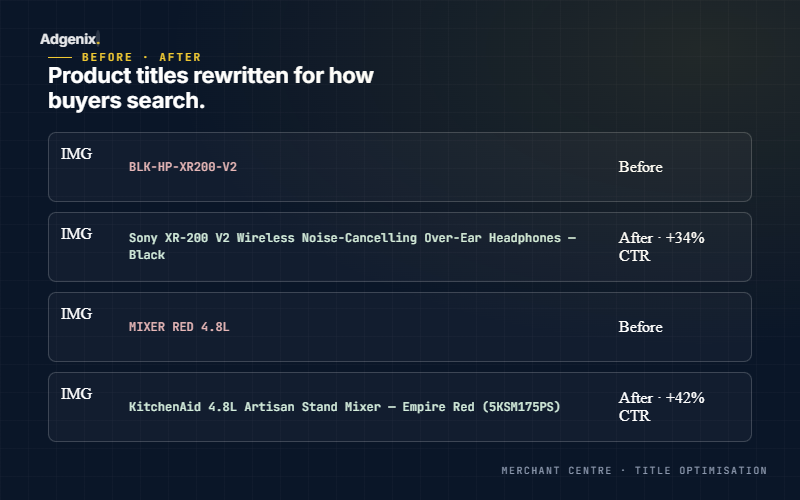
- Your feed is your campaign. If your product titles don’t contain the terms your customers search, you don’t show. No amount of bid strategy tuning fixes a “Blue T-Shirt” title when customers are searching for “mens blue cotton t-shirt size L.” Most Google Shopping agencies in Melbourne don’t touch titles because it’s slow manual work.
- Performance Max hides where your spend actually goes. Unlike Search, you can’t see which products or keywords drove which conversions inside a PMax campaign, only aggregated asset group reports. Without a feed-level strategy, you’re optimising blind.
- Merchant Centre disapprovals aren’t all equal. A “missing GTIN” on 4 products is cosmetic. A “misrepresentation” policy flag on your whole account can kill your feed overnight.
If you’re weighing whether your account needs dedicated Shopping specialisation right now, the diagnostic in when to hire a Google Shopping specialist covers the unit-economics trigger and self-qualification framework.
For the broader question of which provider tier fits your ecommerce business, the ecommerce PPC agency vs freelance specialist decision framework covers the wider decision.
For platform-specific setup work, see the Shopify setup guide or the WooCommerce setup guide.
For PMax campaign structure guidance, see the Performance Max campaign structure guide for ecommerce.
For diagnosing and fixing GMC disapprovals, see the Google Merchant Center disapproval troubleshooting guide.
Who this is built for
Adgenix’s Google Shopping specialist track is a deliberate fit for a narrow band of e-commerce operators. Not every store should be running Shopping or Performance Max as a primary channel, and not every store with Shopping ads needs a specialist over a generalist Google Ads operator.
E-commerce founders running $3k to $200k/month in paid ads
Stores past the “is Google Shopping working?” question and into the “how do we make it profitable at scale?” question. Catalogues of 50 to 5,000 SKUs with mixed margins across products. Founders who want feed-level decisions made by an operator who reads search term reports rather than just exports them.
E-commerce marketing managers reporting to a CMO or founder
Brands where Shopping/PMax sits inside a wider paid media operation. The marketing manager owns performance and budget; Adgenix runs the Shopping execution layer with weekly visibility, monthly reviews, and no separate account-management layer to translate decisions badly.
Stores where feed health and product margin actually matter
Sub-1,000 SKUs is too small for catalogue-tier segmentation to matter. Above 5,000 SKUs the catalogue management overhead exceeds what a senior operator can sustainably handle solo. Between 50 and 5,000 with margins varying meaningfully across products is the sweet spot.
Services we manage
Product feed audits
We read your feed line by line: usually in Excel or via the Merchant Centre Products tab. For stores up to 500 SKUs this takes 3 to 5 hours. For stores above 500, we sample and target the bottom 20% of converters. Output: a rewritten feed delivered back to you, or feed rules configured in Merchant Centre.
Merchant Centre setup + maintenance
Full setup for new accounts: shipping settings, tax settings, automatic item updates, promotions, free listings. For existing accounts: disapproval triage, policy issue fixes, free listings opt-in if you’re missing organic Shopping traffic.
Performance Max Shopping campaigns
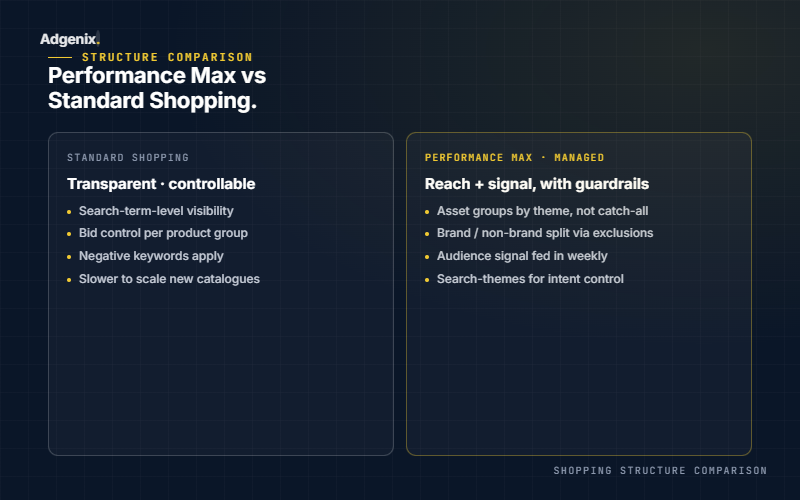
We manage PMax Shopping with deliberate asset group splits by product category, audience signals built from your purchase data, brand exclusions where they matter, and aggressive use of the Insights tab to work around PMax’s reporting opacity. See our broader Performance Max framework on the Google Ads consultant page.
Standard Shopping campaigns
Still alive, still useful for some businesses, particularly when you need tight control, aren’t ready to surrender to PMax’s black box, or have priority high-margin products you want bid up independently.
Shopping feed optimisation with custom labels
Custom labels let you segment products by margin, bestseller status, stock level, seasonality, or any custom attribute, then bid differently on each. Most Shopping accounts use zero custom labels. Setting up five takes 2 to 3 hours and usually delivers a 15 to 25% ROAS lift inside a quarter.
Shopping audits (standalone)
Free if you’re considering the retainer: start with the free Revenue Leak Report. Same format as the Google Ads audit: 3 to 4 hours of reading, written findings document, 45-minute walkthrough.
Do you need a Google Shopping specialist yet?
The trigger for hiring a Shopping specialist isn’t a static spend threshold or catalogue size. It’s a unit-economics signal: the account can no longer be scaled profitably with the current setup. If you’ve optimised everything visible in the campaign settings and the account still won’t scale profitably past its current ceiling, the next gain isn’t in the campaign interface. It’s upstream, in feed architecture, conversion value configuration, audience signal strategy and asset group segmentation.
Hiring too early wastes budget on specialist depth the account isn’t ready to use. Three conditions where a generalist senior Google Ads consultant is still enough:
- Unit economics still work cleanly at current spend. If you’re at $3,000 a month on Shopping with a stable ROAS that supports the business, the marginal gain from specialist-level work is small relative to the cost.
- The catalogue has limited complexity. Single-product, low-SKU, or uniform-margin catalogues benefit less from specialist segmentation work. The optimisation surface is smaller, and a generalist can cover it.
- Performance is stable, not stuck. If the account isn’t trying to scale and current performance meets business goals, the scaling-wall trigger doesn’t apply. Specialist work compounds when there’s growth to capture; it doesn’t compound when the current state is acceptable and stable.
When all three are true, specialist work probably isn’t the right priority right now. Most accounts we audit fail one or more of them, which is why specialist work compounds for them.
Three questions to ask before you hire any Google Shopping specialist
Most Shopping specialist interviews ask the wrong questions. Years of experience and certifications surface less than three tactical questions can.
“Walk me through the last time you changed a custom_label_0 mapping. What triggered it and what did the data show 30 days later?”
A real Shopping operator has done this multiple times and can describe the trigger (margin variance reveal, slow-moving SKU cluster, new product category launch), the change made, and the 30-day outcome. A generalist will give you a textbook answer about custom labels in the abstract.
“How do you handle a Merchant Centre suspension for misrepresentation when the website looks compliant?”
A real specialist knows it’s almost never about products: it’s about website trust signals, the 2026 in-account identity verification step, and the cool-down dynamics of repeated appeals. A generalist will say “submit a reconsideration request” and stop there.
“What’s your default split between Performance Max and Standard Shopping for a $20k/month account, and why?”
A real specialist has a position with reasoning, usually 60 to 80% PMax, 20 to 40% Standard Shopping for query control and product-level bidding, with the split moving based on feed maturity and conversion volume. A generalist will say “depends on the account” without committing to a starting framework.
How we audit a Google Shopping feed
1. Title coverage check (30 to 60 mins)
Export your current feed titles. Run them against your top 100 Shopping search terms from Google Ads Search Terms report. Flag every product title that doesn’t contain the top 3 search modifiers. Rewrite priority: your top 50 products by gross revenue get titles fixed first.
2. Image audit (20 to 30 mins)
Google Shopping favours images with high contrast, white backgrounds, and the product front-and-centre. We’ll flag products using lifestyle hero images as primary and recommend a swap.
3. GTIN / MPN / Brand check (15 to 20 mins)
Missing identifiers reduce impressions. For branded products, the GTIN must match Google’s product database. For own-brand or private-label, identifier_exists = no must be set correctly.
4. Custom label audit (10 to 15 mins)
Design a 3 to 5 label structure based on: margin tier, stock velocity, new/core/clearance, seasonality, and hero/long-tail.
5. Policy + disapproval sweep (10 to 20 mins)
Merchant Centre Diagnostics tab. Every “Item issue” and “Account issue” triaged by severity. Cosmetic issues get queued; real ones get fixed immediately.
6. Feed freshness check (5 mins)
How often does your feed update? Live API vs scheduled pull vs manual upload matters: price or stock changes that take 24 hours to reach Google cost you conversions.
Standard Shopping vs Performance Max: when each wins
Shopping and Performance Max share the same bidding logic, and the bid strategy you choose decides whether the budget works for you or against you. We explain how we pick between volume-based and value-based bidding, and why budget pacing is our preferred ROAS lever, in the Performance Max bidding guide for ecommerce.
| Situation | Recommendation |
|---|---|
| Established catalogue, 100+ SKUs, broad audience | Performance Max (primary), Standard Shopping (secondary for brand-bid defence) |
| Narrow catalogue, <50 SKUs, niche audience | Standard Shopping + Search, skip PMax initially |
| New Merchant Centre account, no conversion history | Standard Shopping for 60 to 90 days to build conversion data, then layer PMax |
| High-margin hero products + low-margin loss-leaders | Standard Shopping with custom label bid stratification |
| Large catalogue (1000+ SKUs), automation-friendly | Performance Max with asset groups by category |
| Strong brand search presence | PMax with brand exclusions + Standard Shopping for non-brand |
If Performance Max is part of your setup, how you structure it matters as much as the Standard Shopping decision above. Our guide on how to structure Performance Max asset groups and creative for ecommerce covers margin-tier campaigns, product-theme asset groups, and the 2026 platform changes worth auditing.
Where Melbourne Shopping accounts typically leak money
Across Shopping audit work for Melbourne e-commerce brands, the same operational gaps surface repeatedly. None are exotic. All are fixable.
Product feed left on the e-commerce platform’s default export
Shopify and WooCommerce default feeds are functional but generic. They miss custom_label_0 for margin segmentation, MPN coverage on brand-name products, and structured_description for AI-generated content. Most accounts running default feeds are leaving 20 to 40% of catalogue performance on the table.
Performance Max consuming Shopping budget without feed segmentation
Single all-products PMax campaign across mixed-margin catalogues drives spend toward whatever generates conversion value, usually loss leaders and low-margin volume products. Margin-tier segmentation with custom labels is the highest-impact PMax intervention for mixed-margin stores.
GMC disapprovals quietly bleeding revenue
Most stores don’t realise their Merchant Centre Diagnostics tab is showing 5 to 20% of products disapproved. The disapproved products are usually high-revenue items where the feed-to-website data mismatch went unnoticed. Weekly Diagnostics monitoring + structured fix prioritisation is the unlock.
All products at one bid tier regardless of margin
Without margin-aware conversion value strategy or per-product-tier bidding, the algorithm optimises for revenue rather than profit. Stores often discover during audit that their top-spending products by ad budget are not their top-margin products by gross profit.
Bid strategy mismatched to feed maturity
Target ROAS applied before the account has 30+ conversions per 30 days per campaign kills volume. Maximise Conversion Value applied to a stable account leaves margin discipline on the table. The transition window between the two is where most accounts get stuck.
Whatever’s actually happening in your Shopping setup, the Free Revenue Leak Report tells you in 48 hours. No commitment.
Case pattern: mid-size consumer e-commerce catalogue
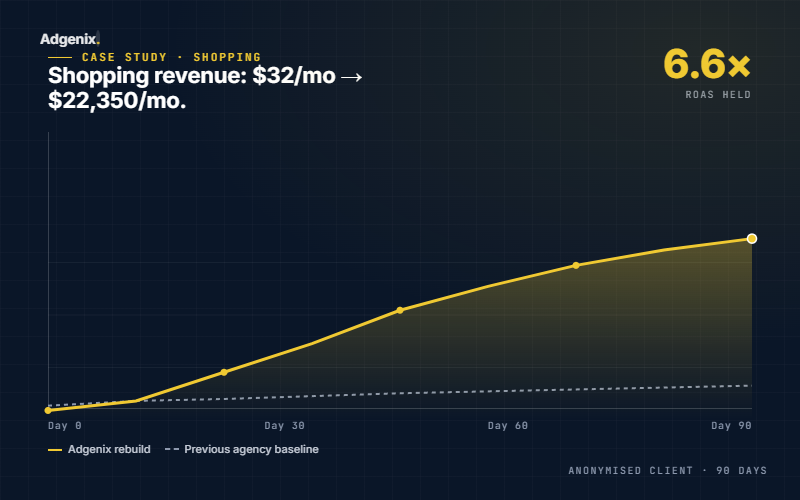
A representative engagement pattern we’ve seen repeatedly on mid-size consumer e-commerce catalogues: a single PMax campaign with every SKU dumped into one asset group, feeds untouched, and disapprovals left to age in the Merchant Centre.
Changes made over a quarter:
- Split PMax into multiple asset groups by product line
- Rewrote around two dozen product titles to include the modifiers customers actually search
- Configured custom labels for
margin_tier(high / mid / low) andseasonality(year-round / peak) - Added a Standard Shopping campaign running in parallel, targeting only the top hero SKUs with manual CPC
- Triaged a backlog of cosmetic Merchant Centre disapprovals that had been sitting for months
Typical result across this pattern: Shopping revenue up meaningfully on modest spend increase, ROAS moving a full point, and PMax contribution to total paid revenue roughly doubling over the quarter.
For ecommerce Google Shopping: senior-led management is structurally different
Most stores searching for an ecommerce Google Shopping agency end up with the same engagement structure that doesn’t fit Shopping’s actual operational requirements: senior pitch, junior execution, monthly reports, retainer pricing scaling with ad spend.
Ecommerce Google Shopping management requires three things generic agency engagement structures often miss: weekly feed health attention (not quarterly), margin-aware campaign segmentation (not gross revenue chasing), and direct operator-to-decision lines (not account-manager translation layers).
Adgenix runs ecommerce Google Shopping as a senior-only operating model. One operator who has personally restructured 50+ Shopping/PMax accounts. Direct contact. Weekly account touch. Monthly performance review focused on what changed and why. If you’ve been running Shopping with an agency where the pitch and the execution come from different humans, this is the alternative.
How a free Google Shopping audit works
- You grant us access to Google Ads (Shopping campaigns) + Merchant Centre (read access is enough)
- We read the feed and account for 3 to 4 hours
- We write an 8 to 15 page findings document covering feed, structure, Merchant Centre health, PMax configuration, and tracking
- We spend 45 minutes walking through it
- You leave with the document and a prioritised fix list
Pricing
Full pricing for Shopping retainers lives on our pricing page. Prefer to start with a one-off audit? Start with the free Revenue Leak Report.
No lock-in, 30-day notice. Ad spend, product photography, and e-commerce platform dev are not included.
The best way to decide if we’d work well together
Hiring a Google Shopping specialist on a discovery call alone is a high-variance bet. Most stores benefit from a smaller commitment that surfaces working style and depth before any retainer discussion.
The Free Revenue Leak Report does this. 48 hours, structured audit of your Shopping/PMax setup and Merchant Centre health, specific findings ranked by revenue impact. No sales follow-up. You keep the report regardless of whether we work together.
If the audit surfaces work you’d rather not do yourself or have your current operator do, that’s the signal to talk. If the audit confirms your current setup is sound, that’s also useful information, and the report is yours either way.
Frequently asked questions
What's the difference between a Google Shopping specialist and a Google Shopping agency in Melbourne?
An agency typically allocates Shopping as one component of a broader Google Ads engagement, often handled by a generalist. A specialist treats Shopping as the primary discipline, with feed work done by the same person running campaigns. For e-commerce stores where Shopping drives >25% of paid revenue, the specialist model usually produces higher ROAS per dollar of management fee.
Do I need Performance Max, or can I just run Standard Shopping?
Depends on catalogue size and conversion history. Small catalogues (<50 SKUs) with niche audiences often do better on Standard Shopping. Mid-to-large catalogues with broad audiences generally need PMax for scale. Most of our clients run both. See the comparison table above.
How often do you update the feed?
The feed itself is updated by your e-commerce platform (Shopify, WooCommerce, Magento, BigCommerce): we configure the connection to push to Merchant Centre in real-time or daily depending on your platform. The feed optimisation work (title rewrites, custom labels) is done in the first 30 days of an engagement and audited quarterly.
What e-commerce platforms do you work with?
Shopify (most experience), WooCommerce, BigCommerce, Magento, and custom carts that expose a product feed endpoint. If you're on Squarespace or Wix, the feed options are limited and we'll tell you that upfront before we start.
Can you fix a suspended Merchant Centre account?
Sometimes. "Misrepresentation" and "untrustworthy promotions" suspensions are often fixable if the root cause is policy compliance on your site. "Account misuse" suspensions are much harder and often permanent. We'll give you an honest read during the audit.
Do you work with my existing Google Ads agency if they handle Search?
No. Shopping and Search share budgets, audiences, and branded-traffic signals, splitting them between two managers creates conflicts we won't take responsibility for. If you want us on Shopping, we'll want Search too, or at minimum the handoff needs to be one person handing to another, not two people running in parallel.
Can you manage my Meta Ads too?
Yes: see the Meta Ads specialist page. Combined e-commerce stack pricing applies.
Is Adgenix an ecommerce Google Shopping agency?
Adgenix is a senior specialist paid media operation, not a traditional agency. The scope of work overlaps with what stores hire ecommerce Google Shopping agencies for (feed management, PMax, Standard Shopping, Merchant Centre health) but the operating model is different. One senior operator on every account, month-to-month engagement, fixed monthly fee set by spend band, not a percentage of ad spend.
How is ecommerce Google Shopping management different from generic Google Ads management?
Ecommerce Google Shopping management is feed-first work. The feed determines what shows up, when, against which queries, at what margin. Generic Google Ads management is keyword-first. The skill sets overlap but the daily operational rhythm is different. Shopping operators spend more time in Merchant Centre Diagnostics, feed enrichment, and custom label strategy than in keyword research and ad copy testing.
Do you work with ecommerce stores on Shopping specifically, or as part of broader Google Ads management?
Both engagement structures are available. Shopping-only retainers work for stores where Search isn’t a significant channel or is already handled internally. Combined Shopping + Search + PMax management is more common: most ecommerce DTC brands run all three channels and benefit from a single operator coordinating them rather than fragmenting decisions across multiple specialists.
Can you audit a Melbourne ecommerce store’s Google Shopping setup before any commitment?
Yes. The Free Revenue Leak Report is structured to do exactly this: 48 hours, specific findings on feed health, PMax structure, Merchant Centre status, and conversion value strategy. The audit is the lightest version of working together. Most stores use it as a low-commitment evaluation before deciding on ongoing Shopping management.