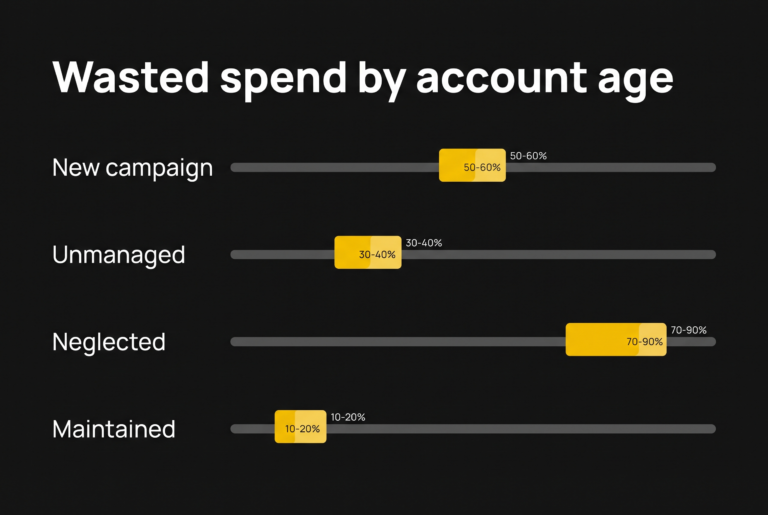
Most Google Ads accounts waste 30 to 40 percent of search spend on queries that have no commercial value. For how this changes with account age, see my Google Ads wasted spend benchmarks. On audited accounts that haven’t had structured negative keyword work, that figure climbs to 70 to 90 percent. A systematic negative keyword strategy, built on intent gates rather than ad-hoc additions, typically eliminates 40 to 60 percent of that waste within the first month and redirects budget toward queries that actually convert.
This article walks through the framework a Google Ads expert in Melbourne uses across managed accounts. It covers the five intent gates, the match-type implications, and the maintenance cadence that keeps the system working. It’s the same approach you’ll find applied (or absent) on every paid media audit we run.
Why most negative keyword strategies fail
Most accounts treat negative keywords reactively. A junk query shows up in the search-terms report, someone adds it as a negative, and the account moves on. Six months later, the same search-terms report is full of similar junk queries. They’re variations of the original, plus new patterns nobody caught.
The reactive approach has a structural problem. It assumes search-term data will always reveal the wasteful patterns, but it won’t. Google Ads shows you a sample of search terms, not the complete set, and the percentage shown has decreased over time. By the time a wasteful pattern appears in the report, you’ve already paid for it dozens of times.
Systematic negative keyword work flips the approach. Instead of waiting for queries to show up and then blocking them, you build a classification system that intercepts categories of waste before they accumulate. The work is front-loaded, usually a 2 to 4 hour audit per account at the start, but the maintenance afterwards drops to 15 to 30 minutes per fortnight.
There’s a trade-off worth naming upfront. Aggressive negatives prevent waste but can also prevent valuable variant queries. A broad-match negative for “cheap” will block “cheap shipping” searches, which are often high-intent for some e-commerce categories. The framework below addresses this directly, with different intent gates getting different match types applied at different levels of the account.
There’s a second reason proactive work matters more now than it used to. That deserves its own section before we get into the framework.
Why this matters more in 2026 than it did three years ago
Search behaviour has shifted in ways that make reactive negative keyword work substantially more expensive than it used to be.
The change driver is AI assistants. ChatGPT, Claude, Perplexity, and Gemini have absorbed most low-effort informational queries that used to go to Google. People asking “how does X work” or “what is Y” increasingly get those answers from an AI assistant directly. What’s left in Google search results is a different mix, and a larger share of what remains is queries that look commercial but are actually research-stage queries that won’t convert.
This shows up in search-terms reports as queries like:
- “best [product category] for [specific situation]”
- “[brand A] vs [brand B] which is better for [use case]”
- “[product] reviews 2026”
- “is [product type] worth it”
- “[product] comparison guide”
Three years ago, a query like “best running shoes for plantar fasciitis” had a healthy mix of researchers and active buyers. Today, the active buyers are increasingly bypassing Google for this kind of query. They go straight to AI assistants for the research, then search Google with much more specific purchase-stage queries like “[brand] [model] [size] buy”. The “best…for…” queries that used to convert are now disproportionately late-stage researchers comparing options before buying elsewhere, including buying through AI assistant recommendations that the researcher already trusts.
The implication for negative keyword work is direct. Waiting for the search-terms report means paying for these queries first, then deciding they were waste. In 2020 this was acceptable because the cost-per-mistake was low and the conversion rate on research queries was high enough to break even. In 2026 the cost-per-mistake is higher because AI-influenced research queries convert at much lower rates than they did when Google was the only research channel.
Proactive negation, building intent gates that intercept research-stage query patterns before they generate clicks, has shifted from “nice optimisation” to core to staying profitable. Accounts that still treat negative keyword work as reactive cleanup are losing budget on click costs that didn’t exist as wasted spend three years ago, because the queries that generated those clicks didn’t exist in their current form three years ago either.
This is also why the framework below leans heavily on Gate 2 (informational without buying intent). Three years ago, Gate 2 was a smaller share of waste than Gate 1 (commercial mismatch). Today, on most e-commerce accounts we audit, Gate 2 is the biggest single source of waste. That shift is directly because of how AI has absorbed Gate 2’s natural traffic and left only the residual queries behind on Google.
The intent-gate framework for negative keyword strategy in Google Ads
Every wasteful search query falls into one of five categories. We call these intent gates because the question for each one is the same. Should this query ever match, under any circumstance, on this account?
The five gates:
Gate 1: Commercial mismatch
Queries with commercial intent for a product or service we don’t sell. A B2B SaaS company bidding on “marketing software” picks up “marketing software for nonprofits”. Commercial intent, but not their market. The query converts somewhere, just not for this advertiser.
Gate 2: Informational without buying intent
“How does X work” or “what is Y” queries that signal research, not purchase. As covered in the previous section, this gate has grown substantially as a share of total waste since AI assistants absorbed most pure-informational traffic. These queries can have value at the top of funnel for high-AOV businesses. For most direct-response accounts they drain budget without converting, and the conversion rate on these queries has declined further as AI assistants increasingly influence the eventual purchase decision.
Gate 3: Wrong product or wrong-fit attribute
The query is in the right category but specifies an attribute we don’t match. A cycling shop bidding on “road bike” picks up “kids road bike”, which is the right category but wrong product line. Or a premium furniture store picking up “cheap dining table”, which is the wrong price positioning.
Gate 4: Wrong geography
Queries with explicit non-target geography. An Australian business bidding on “ecommerce platform” picks up “ecommerce platform USA” or “ecommerce platform UK”. Geo-targeting catches most of this, but query language often slips through.
Gate 5: Brand confusion
Queries that include a competitor brand name combined with a generic term, or queries about the advertiser’s own brand that they don’t want to pay to capture (because organic would rank anyway). The first kind is unprofitable. The second is wasteful.
Most accounts have wasteful queries across all five gates simultaneously. The framework’s value is forcing classification before adding any negative. Once you know which gate a query belongs to, the right match type and account level become obvious.
Worked example
Take a hypothetical e-commerce account selling premium running shoes. Looking at a 30-day search-terms report, you’d typically see waste in 3 or 4 of the gates:
| Search term | Gate | Why it’s waste |
|---|---|---|
| “free running shoes” | Gate 1 | Commercial intent, but “free” implies giveaway-seeking, not buying |
| “history of running shoes” | Gate 2 | Informational; drains awareness budget on no-purchase intent |
| “kids running shoes” | Gate 3 | Right category, wrong product line (adult-only store) |
| “running shoes USA” | Gate 4 | Wrong geography (Australian store) |
| “[competitor] running shoes review” | Gate 5 | Competitor research, low conversion likelihood |
Each one needs different handling. Gate 1’s “free” gets a broad-match negative at account level. Gate 2’s “history of” needs a careful phrase-match negative. You don’t want to block “running shoes for historical re-enactment” if that exists, though usually it doesn’t. Gate 3’s “kids” can be a campaign-level negative if you have an adults-only shop. Gate 4’s “USA” is often handled better with geo-targeting refinement than negatives. Gate 5’s competitor names need brand-protection thinking, not just blocking.
This is where most reactive negative keyword work falls apart. Adding “free” as a negative because it appears in a junk query seems obvious. Adding it without considering whether you also sell anything legitimate involving “free” (free shipping, free returns, free trial) is how you break valuable queries.
Match types and where to apply negatives
Negative keywords have their own match-type behaviour, and it’s not the same as positive keyword match types. Getting this wrong is one of the most common reasons negative keyword work backfires.
Negative broad match blocks queries containing all the words, in any order, with no variations. “running shoes” as a negative broad blocks “running shoes for sale” but does NOT block “shoe for running”. Word order matters here, even though “broad” suggests otherwise. It also does NOT block “runner shoes” because there’s no synonym matching.
Negative phrase match blocks queries containing the exact phrase in order. “cheap shoes” as a negative phrase blocks “cheap shoes online” and “buy cheap shoes” but does NOT block “shoes for cheap prices”.
Negative exact match blocks only the exact query, including close variations like plurals and slight word reorderings. “[free shoes]” as a negative exact blocks “free shoes” and “free shoe” but nothing else.
The first trade-off worth naming. Broader matching catches more waste but risks blocking valuable variant queries. Tighter matching is surgical but requires you to anticipate every variation. Most accounts need a mix.
Where to apply negatives
The level you apply a negative at determines its scope.
Account level (shared negative lists) applies to all campaigns. Use this for terms that have zero possible value across the entire business: brand-confusion negatives for unrelated industries, generic spam terms like “free download” or “torrent”, or clearly off-topic categories.
Campaign level applies to all ad groups in one campaign. Use this for campaign-specific exclusions. If you have a “premium products” campaign and a “discount products” campaign, “cheap” goes negative on the premium campaign and stays open on the discount campaign.
Ad-group level applies to one ad group only. Use this for surgical exclusion when one ad group’s keywords overlap with another’s. If your “running shoes” ad group and your “trail shoes” ad group both pick up “trail running shoes”, you might decide the trail ad group should win that query and add “trail” as a negative on the running ad group.
The judgment call is to apply at the highest level the negative makes sense for. Account level for universal exclusions, campaign level for campaign-specific, ad-group level only when you genuinely need surgical control. Most accounts over-use ad-group-level negatives because that’s where Google’s UI surfaces the suggestion, but the maintenance overhead multiplies fast.
Failure mode: the over-broad negative
The most common failure pattern. Someone sees a junk query, adds the most obvious word as a broad-match negative at account level, and inadvertently blocks dozens of legitimate variant queries.
Example we’ve seen on audits: an Australian e-commerce account selling women’s clothing added “men” as an account-level broad-match negative, trying to block queries like “men’s clothing”. This worked for the intended exclusion but also blocked queries containing “amen”, “gentleman”, “performance management”, and any other phrase containing the letters “m-e-n”, because broad-match doesn’t care about word boundaries the way you’d intuitively expect.
The query report won’t show what’s been blocked. You only notice when overall impression volume drops without an obvious cause. By then, two or three weeks of valuable queries have already been excluded.
The discipline. When adding any broad-match negative, search the existing search-terms report for the term as a substring before applying. If anything legitimate matches, switch to phrase or exact match.
Building and maintaining the negative keyword list
Once you have the framework and the match-type discipline, the work splits into two phases. The initial build is a one-time job, usually 2 to 4 hours. Ongoing maintenance is 15 to 30 minutes per fortnight on most accounts.
Initial build: the audit-then-build approach
Don’t start by listing negatives you might want. Start by classifying the actual search-term data.
The process:
- Pull a 90-day search-terms report for the account. 30 days isn’t enough. You’ll miss seasonal patterns and infrequent waste.
- Filter by spend descending. The top 100 queries by spend will typically represent 70 to 80 percent of the search-term spend. Start there.
- Classify each query into one of the five gates (or mark as legitimate, which most should be). Use a spreadsheet column.
- For each gate, determine the right negative. Which word or phrase isolates this gate’s queries without catching legitimate ones, what match type, what level.
- Apply in batches. Don’t add 50 negatives at once across the account. Add per gate, monitor for 48 hours, then add the next.
This process surfaces patterns. You’ll often discover that 5 to 10 strategic negatives eliminate 30 to 40 percent of the waste, not because the queries themselves are common but because they share root patterns that broader negatives can intercept.
Ongoing maintenance cadence
Once the initial build is done, the maintenance work has a different shape. You’re not classifying every search term anymore. You’re checking whether new patterns have emerged that your existing negatives don’t catch.
Cadence by account size:
- $5k to $25k per month spend: Fortnightly check. The sweet spot for catching new patterns before they accumulate cost.
- Above $25k per month spend: Weekly check, but only the top 50 queries by spend. The full search-terms report at this scale is too large to review usefully every week.
The trade-off worth naming. More frequent review catches waste faster but adds maintenance overhead. Fortnightly is the right cadence for most accounts because new wasteful query patterns rarely emerge faster than that, and when they do, they’re usually obvious enough to spot in monthly reports too.
When to migrate negatives between levels
Your negative keyword strategy isn’t static. Periodically, typically quarterly, review which negatives have moved up or down in importance.
Move up to account level when a campaign-level negative also applies to other campaigns. If you’ve added “kids” to three campaigns separately, consolidate to account level.
Move down from account level when an account-level negative is blocking legitimate queries in one campaign. You’ve blocked “free” account-wide, but now you’re running a “free shipping promotion” campaign.
Remove entirely when a negative is no longer relevant. The competitor named in the negative has gone out of business, or the product line you were excluding has been added to the catalogue.
Most accounts accumulate negative-list bloat over time without cleanup. Bloat doesn’t directly hurt performance, but it makes the list harder to audit and increases the chance of unintended blocking when new campaigns are added.
Common mistakes that cost performance
Six patterns we see repeatedly on accounts that have done some negative keyword work but not the systematic version.
Mistake 1: Adding negatives without checking what they also block. Covered above with the “men” example. The discipline of substring-checking before applying is the single highest-impact change most accounts can make.
Mistake 2: Negative-list bloat without cleanup. Lists grow over years without anyone reviewing whether old negatives still apply. Quarterly cleanup is enough.
Mistake 3: Missing brand-confusion negatives. Most accounts remember to exclude their direct competitors but forget about brand-adjacent confusion. Company names that sound similar to theirs, common misspellings of brand names that map to other businesses, generic terms that are also unrelated brand names elsewhere.
Mistake 4: Treating negative keyword work as one-off. Initial build is 80 percent of the value, but the remaining 20 percent requires ongoing attention. Accounts that don’t maintain accumulate slow drift over 6 to 12 months.
Mistake 5: Adding negatives just because a query had no conversions. Counter-conventional point worth naming. Zero-conversion queries are not automatically waste. A query with zero conversions and 1,000 impressions might just have low intent for now and be worth keeping for brand exposure. A query with zero conversions and 10,000 impressions is more clearly waste. The threshold matters.
Mistake 6: Treating the AI shift as someone else’s problem. Some operators assume the AI-research-query shift only affects content publishers and SEO, not paid media. It directly affects negative keyword strategy because the search-term mix on Google has changed. Proactive negation is now table-stakes work, not optimisation work.
The pattern across all six. Assuming the framework is “list of bad words to block” rather than “system for classifying intent”. The list is an output of the system, not the system itself.
When to do this yourself vs when to hire
If you’re running a single Google Ads campaign at $5k+ per month with relatively stable performance, this framework is genuinely applicable as a self-managed system. The initial build takes 2 to 4 hours. The fortnightly maintenance is 15 to 30 minutes. Most senior business owners have this capacity, and the compounding work is in execution, not in the methodology itself.
Where it gets harder:
- 8 or more campaigns running simultaneously. The cross-campaign negative coordination becomes a real problem. Negatives that work for one campaign break another.
- Multi-platform attribution. When you’re also running Meta and trying to figure out which platform actually drove the conversion, the negative keyword work becomes harder to evaluate because the conversion data is mixed.
- Already deep in optimisation cycles. If your account has already had aggressive negative keyword work and performance has plateaued, you usually need a fresh operator perspective rather than more of the same approach.
- Time pressure. If running the account is taking time away from actually running the business, the framework is technically applicable but practically not.
The honest framing. Most $5k to $25k per month accounts can apply this themselves. Most $25k+ accounts benefit from outside execution because the time investment is harder to justify against the cost of senior operator attention. And accounts at any spend level that have plateaued usually need a fresh look more than they need more methodology.
If you’d rather skip the audit-and-build phase, our Free Revenue Leak Report covers exactly this kind of negative keyword analysis as part of a 48-hour account audit. We’ll show you which intent gates your account is leaking through, where the waste is concentrated, and what the negative keyword list should look like for your specific account. No follow-up required, keep the report either way.
For broader Google Ads work, see our Google Ads consultant service, where the same methodology is applied across all paid media work for senior-only delivery.
Adgenix · Senior Paid Media · Melbourne, Australia
Published 2026-05-06 · Last updated 2026-05-06