Written by the senior Google Ads operator at Adgenix. Last updated 13 October 2026.
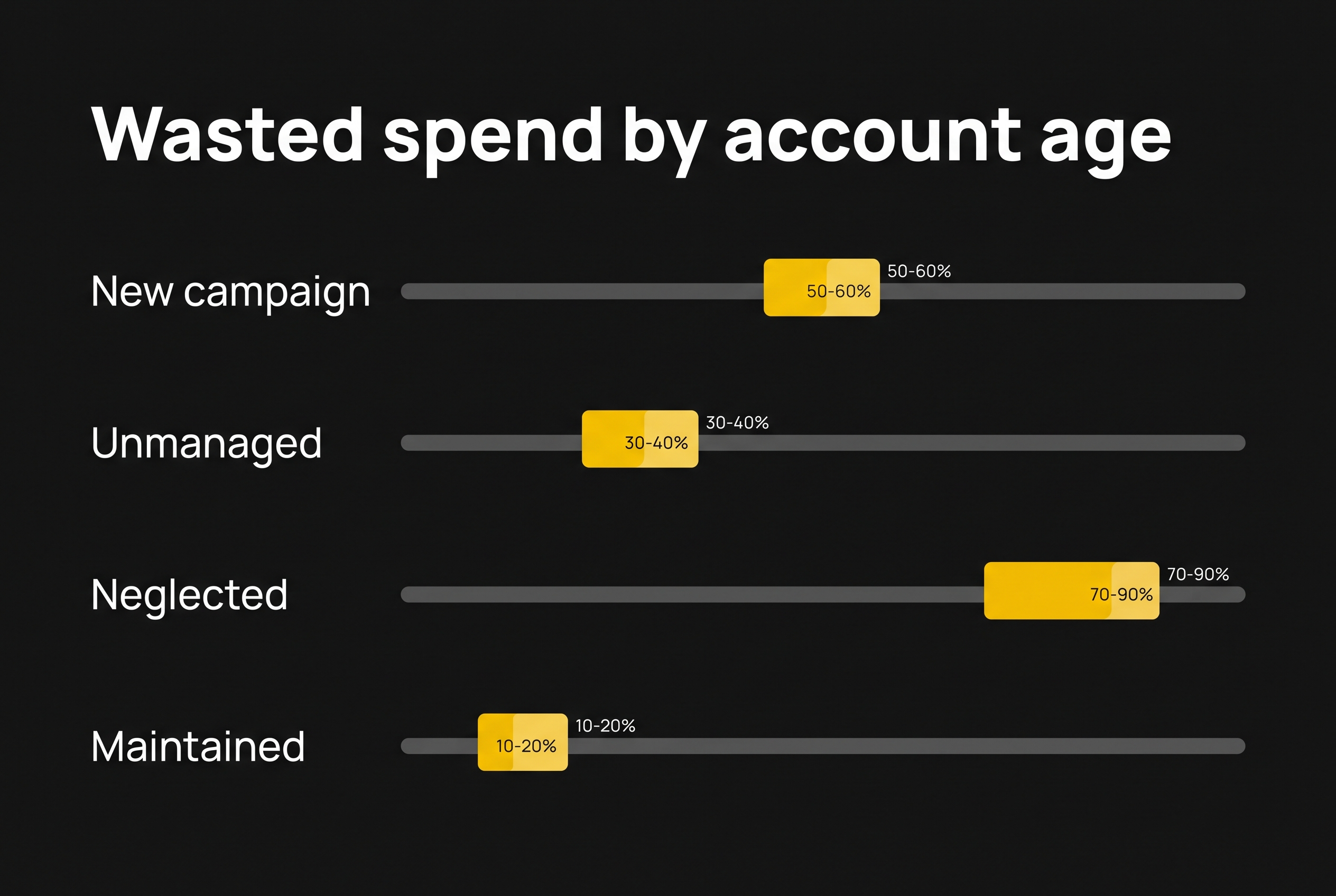
In the ecommerce accounts I audit, wasted Google Ads spend depends mostly on how old the account is and whether anyone maintains it. A new campaign wastes 50 to 60% of spend in its first two to three weeks. A typical unmanaged account sits around 30 to 40%. A neglected broad-match account drifts to 70 to 90%. A properly maintained account holds at 10 to 20%, and it never reaches zero.
Most articles on this topic quote a single number. A single number is misleading, because the answer changes completely with account age, match types and maintenance. This guide gives you the benchmark for each stage, explains why each stage behaves the way it does, and shows you how to measure your own account in about 20 minutes.
What counts as wasted Google Ads spend?
Wasted spend is money paid for clicks from searches that could never become customers. That definition is narrower than the one most studies use, and the difference matters.
Most published figures count every search term with zero recorded conversions as waste. That overstates the problem in two ways.
First, a search term with no conversions in 30 days is not automatically worthless. A term with 4 clicks and no sale has not had enough traffic to judge. A research search from someone early in their buying journey can lead to a sale weeks later through a different search.
Second, zero conversions can be a tracking fault, not a traffic fault. If your conversion setup is broken, every benchmark in this article is meaningless for your account. That is why I check what an account counts as a conversion before I look at search terms at all. If page views, add-to-carts or duplicate purchases sit in the main conversion column, the waste figure is wrong in both directions. My guide to setting up Google Ads conversion tracking covers how to check this.
So for this article, waste means two things:
- Structural waste: searches with no possible path to a purchase from your store. Job seekers, people hunting for free products, people trying to reach eBay.
- Proven waste: searches that have spent enough to judge and still produced nothing.
How much data is enough to call a search term waste?
There is no fixed threshold that works across every account, and anyone who gives you one is simplifying. The right point depends on the campaign type, what the campaign is for and what you need it to deliver. A brand campaign, a prospecting Search campaign and a Performance Max campaign each tolerate different amounts of unproven traffic.
I judge search terms against the account’s average cost per click, not against a target cost per sale. A term that has collected many clicks at the account’s normal CPC with no sale is a different signal from a term with one or two clicks.
The second test is effort against return. If a search term picked up one click at $1 over the last 30 days, adding it as a negative takes more time than the money it will ever cost. I spend review time on the terms where the spend is large enough to matter, and leave the long tail of one-click terms until a pattern shows up across several of them.
Zero-conversion spend and wasted spend are different numbers, and the gap between them is where most bad negative keyword decisions get made.
Wasted spend benchmarks by account age
These are the ranges I see in the Australian ecommerce accounts I manage and audit across Search, Shopping and Performance Max.
| Account stage | Typical wasted spend | Main cause |
|---|---|---|
| New account or new campaign, first 2 to 3 weeks | 50 to 60% | Google exploring which searches match your ads |
| Typical unmanaged account (some setup, no regular review) | 30 to 40% | Negatives added once, then left alone |
| Neglected account with broad match or AI Max, no review | 70 to 90% | Match expansion with nothing pulling it back |
| Properly maintained account | 10 to 20% | Google testing new searches, caught at each review |
Why a new campaign wastes 50 to 60% in its first weeks
A brand-new campaign has no history, so Google has to find out which searches convert by spending money on them. Broad match, AI Max and Performance Max all start wide on purpose. In the first two to three weeks, a large share of clicks comes from searches that are loosely related to your products at best.
Some of this is unavoidable. You cannot know in advance every irrelevant search a campaign will attract. You can shrink it, though. A starting negative keyword list built before launch, covering the predictable junk categories below, typically removes the worst of it on day one.
The mistake I see most often is judging a new campaign on its first fortnight. A 55% waste figure in week two is normal. The same figure in month four is a maintenance problem.
I review every new campaign manually each week, adding negatives as the search terms come in, until it has delivered consistent performance on Smart Bidding for four consecutive weeks. Only then does it move to the normal review cadence for its spend level. Before that point, Smart Bidding is still learning, and a week without review can lock in the wrong searches.
Why a maintained account never gets below 10%
Google never stops testing new searches against your ads, so a well-run account always carries some waste. Every new match expansion, every new product in the feed and every shift in how people search creates fresh irrelevant queries. They appear between reviews and get caught at the next one.
That is why I treat 10 to 20% as the healthy range, not a failure. If someone promises to take your waste to zero, either they are restricting the account so tightly that it misses real buyers, or they are measuring waste in a way that hides it. Keeping an account in that range is the ongoing work of Google Ads management for ecommerce stores.
Negative keywords are ongoing work, not a one-time setup. An account that had a clean list 12 months ago and no review since is not a maintained account.
Why neglected accounts drift to 70 to 90%
Broad match and AI Max expand reach automatically, and without regular review there is nothing pulling that expansion back. The account does not jump to 80% waste overnight. It drifts, one loosely related search at a time, until the irrelevant traffic outweighs the relevant traffic.
The pattern is easy to spot in an audit. The top 20 search terms by cost include several that have nothing to do with the products, the negative keyword list has not changed in months, and the account owner believes the campaigns are “running fine” because the platform’s ROAS figure still looks acceptable. That ROAS figure is often propped up by brand searches from people who were going to buy anyway, which hides how much the non-brand spend is wasting.
What the published studies say, and why they disagree
Three widely cited sources give answers that sit far apart.
- WordStream (2026): across 15,666 self-selected accounts, the median account wasted $1,127.54 a month against median spend of $3,127.38. That works out to roughly 36% of spend. The data covers January to November 2025. (WordStream)
- Doctor Ads (2026): zero-conversion search term spend ranged from about 6% in the best-run account to nearly 40% in the worst within the same industry. A larger 2026 dataset of 84 advertisers had a median of 39.4%. (Doctor Ads)
- Disruptive Advertising (2016): across audited accounts with working tracking, 60.73% of spend went to search terms that never converted, with a per-account median of 75.8%. (Disruptive Advertising)
They disagree because they measure different things. All three count zero-conversion spend, which includes searches that simply have not had enough clicks to judge. Their samples also differ. WordStream’s accounts are self-selected users of a free grader, Doctor Ads uses its own managed clients, and Disruptive’s figure is a decade old and predates Performance Max and AI Max.
The published averages land close to the 30 to 40% I see in unmanaged accounts, which suggests most advertisers are running accounts that nobody reviews regularly. None of the three studies separates new accounts from mature ones, and none looks at ecommerce on its own. Account age explains more of the variation than any industry average.
One WordStream finding stands out. Accounts with at least one negative keyword averaged a 13% conversion rate, compared with 4.6% for accounts with none, and 25% of accounts had not added a single negative keyword. A gap that large is unlikely to come from negatives alone. Accounts with negatives are also more likely to be managed in other ways. It is still a clear signal that basic maintenance separates working accounts from failing ones.
The four search types that can never buy from your store
In ecommerce accounts, most structural waste falls into four categories. These are the ones I block before a campaign launches.
- Job seekers. Searches like “warehouse jobs”, “[product] packing careers” or “[brand] hiring”. People looking for work, not products. Google matches them to your ads anyway, especially under broad match.
- Second-hand hunters. “Used [product]”, “[product] gumtree”, “second hand [product]”. They have already decided not to buy new. An ad for a new product is exactly what they are filtering out.
- Freebie hunters. “Free [product]”, “giveaway”, “free sample”. The click costs the same as a buyer’s click, and the buyer never arrives.
- Marketplace navigators. “[product] eBay”, “amazon [product]”. They are trying to reach a marketplace and your ad got in the way. Some click it by accident, and you pay either way.
If you sell on eBay or Amazon yourself, the fourth category needs care. Those searches may suit a marketplace campaign even when they waste money in Google Ads.
Where this waste hides in Performance Max and Shopping
Shopping and Performance Max waste is harder to see than Search waste, because you do not choose the searches. Google matches searches to your product feed. If your product titles are vague, Google fills the gap with loosely related searches.
In Performance Max, check the search terms report and the search term insights regularly, and use account-level negative keywords for the four categories above. In Shopping, the strongest long-term fix is in the feed: titles that match what buyers search, so Google has less room to guess. My Performance Max structure guide covers how to set this up.
Searches that look like waste but are not
Not every low-converting search belongs on your negative list. Some depend entirely on what you sell.
“How to fix [product]” is the clearest example. For a store selling replacement parts, a repair search is a buyer partway through their journey. They fix things themselves, and they need parts to do it. For a store selling finished goods, the same search is usually someone trying to avoid a purchase.
Same search, opposite verdicts. Blocking by rule is as lazy as keeping by rule. The deciding factor is what your store sells and what your own data shows converts, given enough clicks to judge.
This is also why I avoid sweeping single-word negatives like “how” or “guide” in ecommerce accounts without checking the search terms behind them first. A broad negative written in a hurry can block real buyers for months before anyone notices.
How to measure your own wasted spend in 20 minutes
You can get a reliable estimate without any tools beyond your Google Ads account.
- Check your conversions first. Open your conversion actions and confirm that the main conversion column counts purchases only. If it counts add-to-carts or page views, fix that before going further.
- Open the search terms report for the last 90 days. In Google Ads, select Campaigns in the left menu, then Insights and reports, then Search terms. Ninety days gives enough clicks to judge most terms.
- Sort by cost, highest first. The top 100 terms usually cover most of your spend, so start there.
- Classify each term. Mark it as relevant, structural waste (the four categories above) or proven waste (many clicks at your average CPC, no sales). Skip one-click, low-cost terms. They are not worth the time yet.
- Add up the waste. Divide the cost of structural plus proven waste by total search term cost. That percentage is your figure.
- Compare it with the benchmark for your account’s stage. A campaign launched last month and an account running for two years should not be judged against the same number.
Brand searches belong in a separate column. My guide to brand vs non-brand ROAS explains how to split them. If people searching your store’s name are mixed into the same totals, they inflate your overall performance and make the waste share look smaller than it is. Cutting this waste is the first job of a Google Ads specialist for small businesses.
What is an acceptable level of wasted spend?
For an established ecommerce account, 10 to 20% is healthy, 20 to 30% means maintenance is slipping, and anything above 30% in an account older than three months is a problem worth fixing this week.
A new campaign gets more room. Above 50% is normal for the first two to three weeks. If it is still that high once the weekly reviews have had a month or two to work, the starting structure or the product feed needs attention, not just more negative keywords.
How often you review decides which range you stay in. I review accounts spending under $5,000 a month at least monthly, $5,000 to $25,000 fortnightly, and above $25,000 weekly for the top search terms. The full process, including which match types to use for negatives, is in my negative keyword strategy guide. If the waste is above these ranges, it’s time to hire a Google Ads specialist.
Frequently asked questions
What percentage of Google Ads spend is wasted on average?
The two most recent published studies put the median at roughly 36 to 40% of spend on search terms with no conversions. In ecommerce accounts I audit, the figure depends mostly on account age and maintenance: 50 to 60% in new campaigns, 30 to 40% in unmanaged accounts and 10 to 20% in maintained ones.
Can you get Google Ads wasted spend to zero?
No. Google keeps testing new searches against your ads, so every account carries some waste between reviews. A maintained ecommerce account typically holds at 10 to 20%. A claim of zero waste usually means the account is restricted so tightly that it misses real buyers, or waste is being measured selectively.
Is a search term with no conversions always wasted spend?
No. A term needs enough clicks at your account’s average cost per click before zero conversions means anything, and the right amount depends on the campaign type and its purpose. Some research searches lead to purchases later. Zero conversions can also point to a tracking fault rather than bad traffic.
How often should I review search terms to control waste?
Review frequency should match spend. Accounts under $5,000 a month need at least a monthly review, $5,000 to $25,000 a fortnightly review, and accounts above $25,000 a weekly check of the highest-cost search terms. New campaigns need weekly reviews regardless of spend, until they deliver consistent performance on Smart Bidding for four consecutive weeks.
Why is my new Google Ads campaign wasting so much?
New campaigns have no performance history, so Google spends money finding out which searches match your ads. Waste of 50 to 60% in the first two to three weeks is normal. A pre-launch negative keyword list for predictable junk, such as job and freebie searches, reduces it from day one.
Where to go from here
The benchmark that matters is the one for your account’s stage. If you have never looked at your search terms report, the 20-minute check above will tell you which range you are in. If the result is above 30% in an established account, the fix usually starts with conversion tracking and a structured negative keyword review, in that order.
If you would rather have someone senior run that check, the Free Revenue Leak Report covers your search terms, conversion setup and Shopping or Performance Max structure, with the waste figure calculated for your account. For broader help running an ecommerce account, see my ecommerce PPC management service.