Written by the senior Google Ads operator at Adgenix. Last updated October 2026.
For an ecommerce store, a primary conversion in Google Ads should be a completed purchase, recorded once per order, with the order value attached. Everything else, such as add to cart or product views, belongs in secondary, where you can watch it without Smart Bidding chasing it.
That sounds obvious. In the accounts I audit, it is the setting most often wrong, and it is the first thing I check. If the conversion column counts the wrong things, every ROAS figure, every CPA and every bidding decision built on it is wrong too.
This guide covers which actions belong where, the two setups I find most often, and what I do when an audit turns up junk conversions.
Primary vs secondary conversions: what is the difference?
Primary conversion actions drive bidding. Secondary conversion actions are only observed.
Google’s own definition is short (Google Ads Help):
- Primary actions report in the “Conversions” column and are used for bidding when their goal is used for bidding.
- Secondary actions report in the “All conversions” column and are for observation only. The exception is a secondary action placed inside a custom goal, which is then used for bidding.
The “Conversions” column is the one in every report your store owner reads. It is also the number Smart Bidding works to increase. Whatever you mark as primary is what Google learns to buy more of.
If an action is primary, you are telling Google it is worth paying for. Choose with that in mind.
What should be primary for an ecommerce store?
A purchase, recorded once per order, with the real order value.
For most stores, that is the whole list. The checks I run on the purchase action:
- It fires on the order confirmation, not the checkout page. Checkout is where people start paying, not where they finish.
- It records each order once. A confirmation page that fires the tag again on reload, or when the customer revisits it, inflates the count. Passing the order’s transaction ID lets Google Ads drop the duplicates.
- It passes the order value. A fixed value of 1 for every sale makes ROAS meaningless and leaves value-based bidding with nothing to work with.
- There is only one primary purchase action. Two actions tracking the same sale (for example, a Google Ads tag and a platform app both firing) double the count.
My conversion tracking setup guide covers how to install and test the purchase tag. This guide is about the judgement call that comes before and after setup: what should be allowed to drive bidding at all.
Which conversion actions are most often wrongly set as primary?
In my audits, two setups come up more than any other: page views counted as conversions, and GA4 imports used as the only purchase tracking. They fail in opposite directions. One inflates results. The other hides them.
Page views counted as conversions
A page view conversion fires when someone loads a page, such as a product page, the cart or a thank-you page that also loads for other reasons. It is the easiest conversion to inflate, because almost every click produces one.
The effect on the reports is immediate:
- Conversion counts rise far above the number of real orders.
- Cost per conversion looks cheap.
- Conversion rate looks strong.
Sometimes this is a setup mistake. Sometimes it is used to make weak performance look acceptable in a monthly report. Either way, the store owner is reading a number that has nothing to do with sales, and Smart Bidding is buying clicks from people who look at pages.
The quickest test is to compare Google Ads conversions with orders in your store for the same period. If Google Ads reports more conversions than your store took orders, from all channels combined, something other than purchases is in the column.
GA4 imports as the only purchase tracking
Importing purchases from Google Analytics 4 looks tidy. One tag, one source of truth. For ecommerce, it usually costs you conversions.
The reason is how GA4 hands conversions to Google Ads:
- Credit is shared with other channels. Under GA4’s default attribution, credit for a sale can go to organic search, email or direct traffic, and only the share credited to Google Ads is imported (Adswerve).
- No native enhanced conversions. GA4 imports do not get Google Ads’ own enhanced conversions, which recover sales that cookie-based tracking misses (Adswerve).
- No view-through conversions from the native tag.
The result is an account that reports fewer sales than the ads drove. Smart Bidding then sees campaigns as weaker than they are, and bids down on traffic that was working. Fixing this is where I start when managing Google Ads for an online store.
I usually see this setup from specialists or agencies with little ecommerce experience. It is common in lead generation, where it can suit. For a store, the native Google Ads purchase tag with enhanced conversions is my default.
GA4 is still worth keeping. It just should not be the only purchase signal Google Ads bids on. The setup guide covers how to switch from GA4 imports to the native tag without counting the same sale twice during the changeover.
Which actions should stay secondary?
Add to cart and product views. I track both, and I keep both out of bidding.
They are useful signals. They show where people drop out of the funnel. A store with plenty of add-to-carts and few purchases has a checkout, shipping cost or trust problem, not a traffic problem. A store with product views and no add-to-carts has a pricing, product page or audience problem.
Kept as secondary, these actions sit in the “All conversions” column. You can read them alongside purchases, and they never steer bids.
Made primary, they do damage:
- Smart Bidding chases the easy action. An add to cart is far more common than a purchase. A campaign told to maximise conversions will find the people most likely to add to cart, who are not always the people most likely to buy.
- Reports overstate results. Cost per conversion falls and conversion counts rise, while revenue stays where it was.
- Value-based bidding gets confused. If add to cart carries a value, the account looks like it is earning revenue it never received.
An add to cart is a sign of interest, not a sale. Track it, read it, and keep it out of the column that decides bids.
How to check your own conversion setup in 10 minutes
You can do this without changing anything:
- Open Goals, then Summary. Look at every conversion action and whether it is primary or secondary.
- List the primary actions. For a store, anything other than a purchase is a question to ask.
- Check the purchase action’s source. Is it the Google Ads tag, a platform app, or a GA4 import? If it is a GA4 import only, you are probably under-reporting.
- Check for duplicates. Open the purchase action and confirm it passes a transaction ID. Without one, a reloaded confirmation page counts the same order twice.
- Compare with your store. Take the last 30 days of Google Ads conversions and compare them with orders from Google Ads in your store platform. A gap in either direction tells you which problem you have.
- Check values. Total conversion value should be in the same range as the revenue those orders produced.
If the primary column holds anything other than purchases, stop there. The next step is fixing it, not reading the performance reports.
What happens when an audit finds junk conversions?
I stop the analysis. Every ROAS, CPA and campaign comparison in the account sits on top of the conversion column, so none of it can be judged until that column is right.
What gets fixed first
- Make sure the real purchase is tracked properly. One action, one count per order, the right value. Removing junk before a working purchase action exists leaves Smart Bidding with nothing to optimise towards.
- Move junk actions to secondary. Page views, add to cart and duplicate purchase actions come out of the primary column. They stay visible in “All conversions”, so the history is not lost.
- Reset bid targets from purchase data. A target CPA or ROAS set against inflated conversions will not hold once the count falls to real orders.
How urgent the fix is
How fast I move depends on how much money the junk conversions are steering.
If page views or add-to-carts are driving most of the bidding and a large share of spend, the account is paying for the wrong outcome every day. That gets fixed straight away, even though performance will look worse in the reports for a while.
If the junk action is small, such as a secondary-looking action that only contributes a few conversions, I schedule the change for a quieter trading period rather than in the middle of a sale.
How long before the data can be trusted again
It depends on how often the account converts.
Google says Smart Bidding typically takes one to two conversion cycles to calibrate to a new objective, and it can be faster when there is more conversion data (Google Ads Help). A store taking many orders a day gives the system plenty to learn from. A store taking a handful of orders a week gives it very little, so the same change takes far longer to settle.
Two practical rules I follow during that period:
- Compare against store orders, not old Google Ads numbers. The old conversion count was wrong, so it is not a fair baseline. Revenue and orders in your store platform are.
- Expect the reported numbers to drop. When page views stop counting, conversions fall and cost per conversion rises. The account did not get worse. The reports got honest.
How this connects to the rest of the account
Conversion setup is the first check in any audit because the others depend on it: The same rules apply to Meta conversions, covered on our Facebook ads consultant in Melbourne page.
- Brand vs non-brand. Splitting ROAS by brand only works if the conversions in both buckets are real purchases. My brand vs non-brand ROAS guide assumes this check is already done.
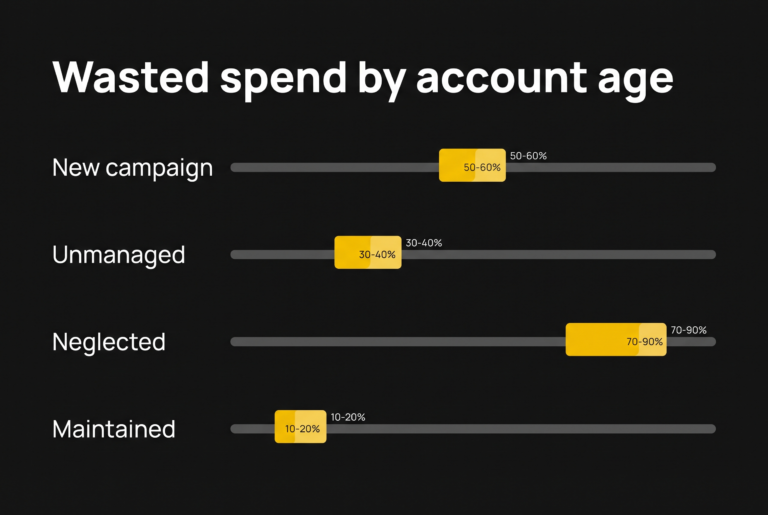
- Wasted spend. A search term that “converted” through a page view is not a winner. My wasted spend benchmarks only hold on clean conversion data.
- Bidding. Target ROAS and Maximise Conversion Value learn from whatever is primary. My Performance Max bidding guide covers which strategy fits which stage.
Frequently asked questions
Should add to cart be a conversion in Google Ads?
Track it, but keep it as a secondary action. Add to cart shows interest and helps you find funnel problems. Made primary, it teaches Smart Bidding to find people who add to cart rather than people who buy, and it makes cost per conversion look cheaper than cost per sale.
Are page view conversions ever useful for ecommerce?
As a secondary action, they can help you see how people move through the site. As a primary action, they inflate conversion counts and make cost per conversion look cheap without any link to sales. If page views are in your primary column, your reports are not measuring revenue.
Should I import conversions from GA4 into Google Ads?
For an ecommerce store, not as the only purchase tracking. GA4 imports share credit with other channels and do not get native enhanced conversions, so they usually report fewer sales than the ads drove. Use the Google Ads purchase tag with enhanced conversions, and keep GA4 for analysis.
How do I know if my Google Ads conversions are wrong?
Compare Google Ads conversions with orders in your store platform for the same 30 days. If Google Ads reports more conversions than you took orders, junk actions are in the column. If it reports far fewer than your store credits to Google Ads, tracking is missing sales, often because of GA4 imports or a broken tag.
Will fixing conversion tracking make my results look worse?
Often, yes, at first. Removing page views or add-to-carts from the primary column lowers the conversion count and raises cost per conversion. Revenue does not change. The reports now show what the account earns, which is the only number worth optimising.
Where to go from here
The 10-minute check above tells you whether your conversion column is counting sales or something else. If it is counting something else, fix that before acting on any other report.
If you would rather have it checked for you, the Free Revenue Leak Report starts with conversion setup before it looks at anything else. For ongoing help, see my ecommerce PPC management service.